



How to Get More People to Join Your Step Challenge

The first wave of sign-ups is always a great moment. Your most enthusiastic walkers join within the hour, a few people tag each other in chat, and the challenge officially feels real.
The next wave is where your registration number grows and where wellness challenge participation is won. The simplest way to get more people to join your step challenge is to think about why each person hasn't registered yet, then give them the one thing that gets them to yes. In our experience, almost everyone still on the fence fits one of five groups:
- People who haven't seen the invite
- People planning to join "later"
- People who started signing up and paused
- People who aren't sure the challenge is for them
- People waiting to see who else is in
Each group needs something a little different. Here's how to bring in every one of them.
Reach the People Who Haven't Seen Your Invite Yet
Plenty of future participants simply haven't seen the invitation yet. It arrived during a busy week, or it went to an inbox they check twice a month.
- Give yourself a two-week runway. Announcing at least two weeks before kickoff lets people hear about the challenge more than once and still register without rushing. Our guide to launching your step challenge with a bang has plenty of ways to build buzz during that window.
- Use the same short message everywhere. Email, Slack or Teams, the newsletter, an all-hands slide. One message with your join link travels easily, and our ready-to-use invitation template gives you a starting point to personalize.
- Hand managers something they can paste. Managers reach the people who skim company-wide announcements, and a ready-to-post message does the work for them:
Our Stridekick challenge starts Monday! It's quick to join, works with whatever tracker or phone you already have, and you can go at your own pace. Join here: [LINK] · Challenge code: [CODE]
Running a challenge for a club or friend group? Your coach, captain, or the person who runs the group chat plays the same role.

Give "Later" a Date
"I'll join later" is a friendly yes that just needs a date attached. A reason to register today works far better than a reminder to register eventually.
A few real deadlines work well:
- A final join date. If you set a final join date in your challenge settings, "Registration closes Friday" is a real deadline. Include the date in every reminder.
- Teams lock. In a Team Leaderboard challenge, participants should join a team before the challenge starts. Depending on your settings, they may not be able to switch afterward. That makes "Teams are set Friday, so grab your spot" a genuine deadline.
- An early-bird drawing. Everyone who registers by a set date gets one entry into a drawing, and you pick the winner at random at kickoff. Our prize strategy for every challenge mode has more ideas that give everyone a shot.
- A shared registration goal. "Help us hit 75 before Monday."
When you share your progress, lead with who's already in: 31 people are already in. Come join them!
That lands much better than a count of who's missing, and it tells everyone else their coworkers are already on board.
Make the Last Step Easy for People Who Started Signing Up
Some future participants have already downloaded the app. They just paused somewhere between creating an account and joining your challenge.
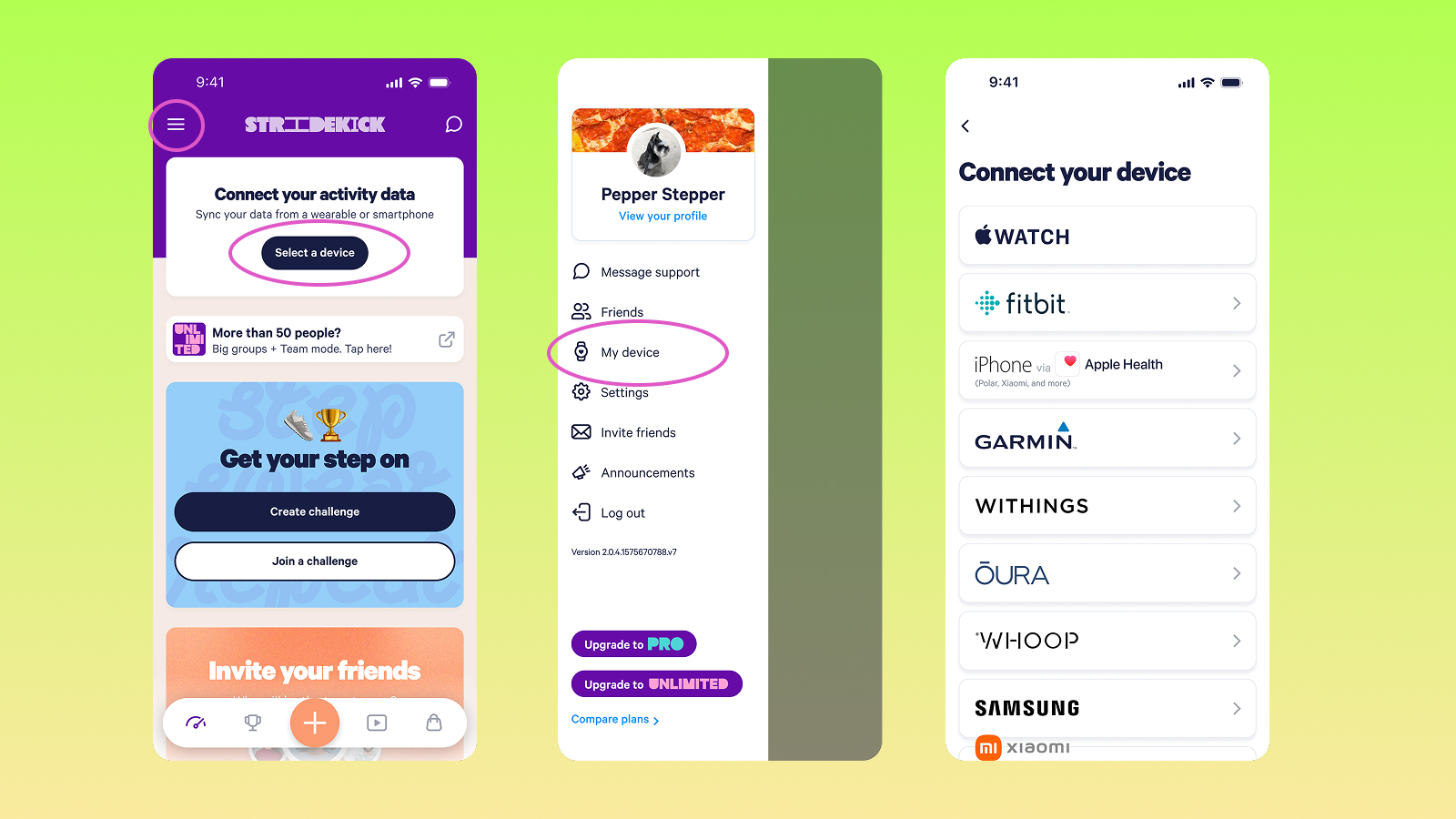
Joining a Stridekick challenge takes three steps:
- Download the app and create an account.
- Join with your link or challenge code.
- Connect a fitness tracker or phone.
Put all three in your invite, in that order, so nobody has to guess what comes next. Participants can connect their device after joining, so nobody needs to finish setup before saying yes.
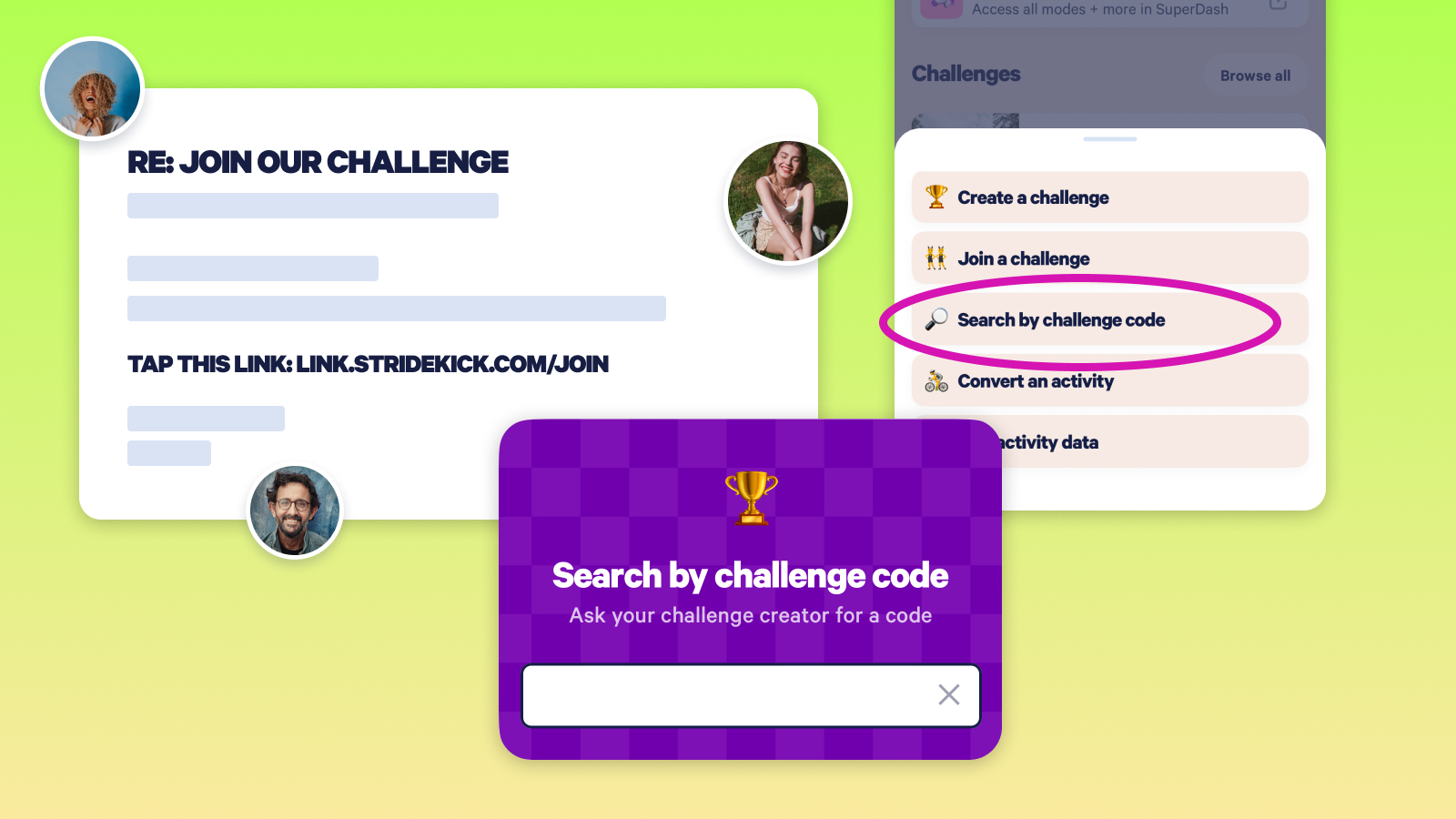
- Always include the challenge code next to the link. If the link doesn't open where it should, participants can tap Challenges, tap the search icon, and join with a challenge code.
- Turn your join link into a QR code. Any free QR code generator works. Put the code on posters, meeting slides, and break-room screens so people can scan and join on the spot.
- Send a "connect tonight" nudge a few days before kickoff. Remind everyone who's joined to connect their tracker or phone, so their steps count from day one.
Show the People Who Aren't Sure It's for Them That They Belong
Some people hear "step challenge" and picture the coworker with 20,000 steps before lunch. Others assume they need a fancy watch. Two lines in your invite welcome both.
Any device works. Stridekick connects with Fitbit, Apple Watch, Garmin, Withings, Polar, and more. Participants without a tracker can use their smartphone or enter activity manually. Put it right in the invite: "Any tracker, or just your phone."
Every step counts. Walking the dog counts. So does a lunchtime lap around the building.
Your challenge setup can carry the same message. With Personalized Challenge Goals on Stridekick Unlimited, each participant works toward a goal that fits their own activity level. Prizes for finishing, hitting milestones, or showing up consistently give every participant a real reason to sign up. Mention those prizes in your invite alongside the grand prize.
Let Participants Invite the People Waiting to See Who's In
Plenty of people decide the moment they know their friends are doing it. A personal "Are you doing this with us?" reaches people a company-wide email never will.
- Ask early registrants to bring one person. "Already in? Grab a coworker and get them in too."
- Recruit one champion per team, office, or location. Give them the link, code, and QR code, and let them spread it in their own words.
- Put team captains to work. In a team challenge, captains have a built-in reason to fill their roster before teams are set.
- Name who's showing up. "Seven departments are already represented. Who's next?"
Your Two-Week Step Challenge Registration Plan
Marketers have an old rule of thumb that people need to see a message about seven times before they act on it. You don't need seven emails. Five dated touchpoints, shared across email, chat, and your managers' posts, add up fast. This timeline works for your first workplace challenge and your fifth company-wide step challenge alike.
- Two weeks out: Announce the challenge with your join link, challenge code, and QR code. Set a registration goal. For example, if you're inviting 125 people and aiming for 60%, your goal is 75 registrations (125 × 0.60 = 75). Adjust based on how your last challenge went.
- Ten days out: Send managers and champions their paste-ready message.
- One week out: Share your registration count, along with what makes the challenge worth joining: teams, prizes, or the virtual map.
- Three days out: Announce your real deadline, like your final join date, teams being set, or the early-bird drawing closing. Send the "connect tonight" reminder.
- Kickoff: Welcome everyone who's in by name or team, and keep the invitation going. Participants can join after the challenge starts unless you've set a final join date.
Keep the Door Open After Kickoff
People can keep joining after day one unless you've set a final join date, so your best invitation is now the challenge itself. "We're two days in and have walked 750,000 steps together. Want in?" shows people exactly what they're joining. From there, our 12 ways to boost engagement in your step challenge will help keep everyone who joined moving through the finish line.
Your wrap-up becomes your next invite, too. "Last time, 87 of us walked 14 million steps together. Ready for round two?"
Where Stridekick Fits
Stridekick keeps the joining part simple: one link, one challenge code, and support for whatever tracker or phone your participants already use. For companies and larger groups, Stridekick Unlimited adds Team and Group modes plus Personalized Goals, so every participant has a reason to sign up. Explore Stridekick Unlimited and start planning your challenge today. For friends, families, and smaller groups, download Stridekick to start a Free challenge, or upgrade to Pro in the app when you want a private, longer challenge.
Quick Answers
How early should I start promoting a step challenge? At least two weeks before kickoff. That gives people time to see the invite more than once, download Stridekick, and register without rushing.
Do participants need a fitness tracker to join a Stridekick challenge? No. Stridekick connects with Fitbit, Apple Watch, Garmin, and other trackers. Participants can also use a smartphone or enter activity manually.
What's a good registration goal for a step challenge? Start from your last challenge's participation and aim a little higher. For a first challenge, pick a percentage of invitees, such as 60%, and multiply your invite list by it. Share the count as it grows.
How do you increase participation in a workplace wellness challenge? Invite people at least two weeks early, give managers a paste-ready message with the join link and challenge code, and set a real deadline like a final join date. Then share your registration count as it grows, so everyone can see their coworkers are already in.
Can people join a step challenge after it starts? Yes. In Stridekick, participants can join after a challenge begins as long as the organizer hasn't set a final join date in the challenge settings.


